Retro gaming sits at the intersection of nostalgia, hardware hunting, and the occasional repair project. You can start with one console and a CRT for under $100, and the hobby scales as far as you want. Here's what to buy first, and the expensive rabbit holes worth skipping until you know you're in.
By Colin B. · Published June 6, 2026 · Last reviewed June 6, 2026
One console, a composite-to-HDMI adapter, and a handful of games gets you started around $80. Add a real upscaler and you're at $200-300.
We earn commission on qualifying Amazon purchases — see our
affiliate disclosure.
Price tiers and budget totals shown above are editorial estimates;
actual Amazon prices vary.
At a glance
Our top pick in each category
The fastest path through this guide — each best-starter pick by category.
Scroll for the budget and upgrade alternatives.
Pick one system before buying anything. The retro collecting rabbit hole has no floor. A focused collection of 30 SNES games beats a chaotic pile spread across eight systems.
Amazon is rarely the right place to buy original hardware. Local thrift stores, Facebook Marketplace, and eBay will beat Amazon prices on consoles by 30-60%. Use Amazon for accessories, cables, and cleaning supplies.
The CRT question is real but not urgent. Retro games look best on a CRT: zero input lag, correct aspect ratio, natural scanlines. A decent upscaler on a modern TV is genuinely good and much easier. Start with the upscaler route; revisit CRTs once you know you're committed.
The gear
What you actually need
Starter System
The most important decision in retro collecting is which era you want to live in. Each generation has different hardware prices, game library sizes, and community depth. Most beginners do best starting with one 16-bit console (SNES or Genesis), where the games are abundant, cheap, and genuinely excellent. The mini consoles below are a good sanity check before you invest in original hardware.
Starter System — what's the difference?
A few common shapes, each making a different trade.
8-bit Era (NES, Atari)
Cheapest hardware; game prices range from $3 to $300 depending on rarity.
Era
1977–1990
Typical game
$3–$60 loose
Best for Pure nostalgia hunters; thrift store bargain diving
Tradeoff Rare titles now command steep prices; stick to common games to start
16-bit Era (SNES, Genesis)
The sweet spot: deep libraries, affordable common titles.
Era
1989–1996
Typical game
$5–$40 loose
Best for First-time collectors; best games-per-dollar ratio of any era
Tradeoff Complete-in-box copies command a big premium; buy loose to start
3D gaming begins. PS1 is cheap; N64 and Saturn are pricey.
Era
1994–2002
Typical game
$5–$120 depending on system
Best for PS1 collectors (huge, affordable library); Saturn is specialist territory
Tradeoff N64 prices spiked sharply; budget $40+ even for common titles
6th Gen (PS2, GameCube, Dreamcast)
Most modern retro era. PS2 has the biggest library ever made.
Era
1998–2006
Typical game
$5–$50 most titles
Best for Collectors who grew up with these systems; easiest library to enter
Tradeoff Too recent for consistent thrift-store bargains; eBay competition is stiff
Best starter
Sega
Genesis Mini 2
$$
★★★★★Our rating
Sixty licensed games including Sonic the Hedgehog 2, Castlevania: Bloodlines, and Shinobi III, with HDMI output built in. No CRT hunting, no upscaler needed. It's how you test whether collecting clicks for you before investing in original hardware and proper cables.
What we like
60 licensed games including Sonic 2, Castlevania: Bloodlines, and Shinobi III
HDMI output built in; plug into any TV and play immediately
Officially licensed with proper controller feel and build quality
What to know
No cartridge slot; you can't play games you find thrift hunting
Fixed library; impossible to expand without original hardware
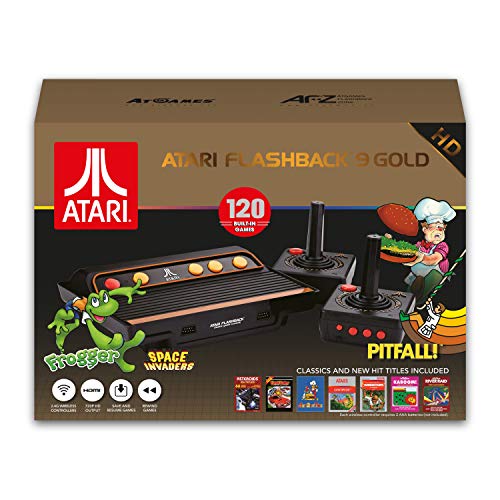
Eighty classic Atari 2600 and 7800 games in one box, including Centipede, Missile Command, and Adventure. The Atari era is where collecting started for many people, and under $40 this is the cheapest possible entry into the hobby. Paddle controllers for Breakout are included.
What we like
80 games including Centipede, Missile Command, and Adventure
Under $40; the cheapest possible taste of retro collecting
Paddle controllers for Breakout and Kaboom included in the box
What to know
Atari 2600 games show their age more than NES or SNES titles
Build quality feels budget; not a lasting piece of hardware
RetroN 5: HD Gaming Console for Game Boy Advance/ Game Boy Color/ Game Boy/ Super NES/ NES/ Super Famicom/ Famicom/ Genesis/ Mega Drive/ Sega Master System (Black)
$$$
★★★★☆Our rating
Accepts original cartridges from NES, SNES, Genesis, Game Boy, and Game Boy Advance and outputs HDMI to your TV. The Swiss Army knife for a mixed collection. Buy original carts at thrift stores and garage sales and play them all on one box without hunting for a CRT.
What we like
Plays NES, SNES, Genesis, Game Boy, and GBA carts in one box
HDMI output with upscaling; no separate adapter needed
Save states on original cartridges, something original hardware can't do
What to know
Emulation-based; noticeable input lag in fast-action games
Occasional incompatibility with certain licensed cartridges
Original hardware is best played with original controllers, but OEM controllers from the 1990s are getting old. Rubber membranes in D-pads degrade, sticks develop drift, and buttons lose their click. 8BitDo has solved this problem with modern reproductions that feel right and connect wirelessly to original consoles (via a Retro Receiver) or directly to PC and Switch.
Best starter
8BitDo
SN30 Pro+ Bluetooth Controller
$$
★★★★★Our rating
Connects wirelessly to SNES, Switch, Android, and PC via Bluetooth, or wired via USB. The D-pad quality matches the original SNES pad, the build quality is excellent, and one controller covers your entire collection. The default choice for any retro setup.
What we like
D-pad rivals the original SNES controller, arguably better
Bluetooth covers SNES, Switch, Android, and PC out of the box
20-hour battery; charges via USB-C
What to know
Slightly larger than original SNES pad; different feel for longtime fans
Bluetooth pairing occasionally drops on older Android firmware
The smallest Bluetooth gamepad 8BitDo makes, under $25, connecting to everything the SN30 Pro+ does. It's the travel controller and the backup for a guest. Not ergonomic for marathon sessions, but perfect for casual play.
What we like
Under $25 and fits in a shirt pocket
Bluetooth covers iOS, Android, Switch, and PC
What to know
No analog sticks; digital-only games only
Too small for long sessions; hand fatigue hits fast after an hour
Plugs into your SNES Classic Mini and lets it accept any 8BitDo or DualShock 3/4 wireless controller. One tiny dongle and your Mini takes wireless input, freeing you from a four-foot cable. Essential once you have the Mini set up for dedicated couch play.
What we like
No hardware modification; plugs straight into the controller port
Works with 8BitDo, DualShock 3/4, and Xbox controllers wirelessly
What to know
Sold separately for SNES vs NES; buy the right model for your console
Adds 1-2 frames of input lag; noticeable in precision platformers
This is the most consequential and confusing purchase in retro gaming. Retro consoles output analog signals (composite, S-Video, or RGB) and your TV wants HDMI. The cheap solution is a $15 composite-to-HDMI box; it works but looks soft. The enthusiast solution is an OSSC or RetroTink that properly converts the console's native 240p signal without the blur. Start cheap, upgrade when the image quality starts to bother you.
Video Output — what's the difference?
A few common shapes, each making a different trade.
Composite
Worst quality but supported by every retro console ever made.
Cable colors
Yellow/Red/White
Image quality
240p, soft and blurry
Best for Getting started cheaply; composite-to-HDMI boxes work fine as a first step
Tradeoff Color bleed and softness are inherent to the signal, not the converter
S-Video
Big step up from composite on SNES, N64, PS1, and Dreamcast.
Cable type
4-pin S-Video to upscaler
Image quality
Sharp 240p, no color bleed
Best for SNES and N64 owners who want better image without buying an OSSC
Tradeoff Needs an S-Video cable plus a compatible upscaler; not all consoles support it
RGB via Upscaler
The enthusiast standard. Best analog output available from retro hardware.
Hardware needed
SCART cable + OSSC or RetroTink
Image quality
Near-CRT quality at 1080p
Best for Serious collectors who want the closest experience to original hardware
Tradeoff Most expensive route; some consoles need an RGB mod to output this signal
Best starter
Pound Technology
HD Link Cable for SNES
$49.99 as of Jun 22, 2026
★★★★★Our rating
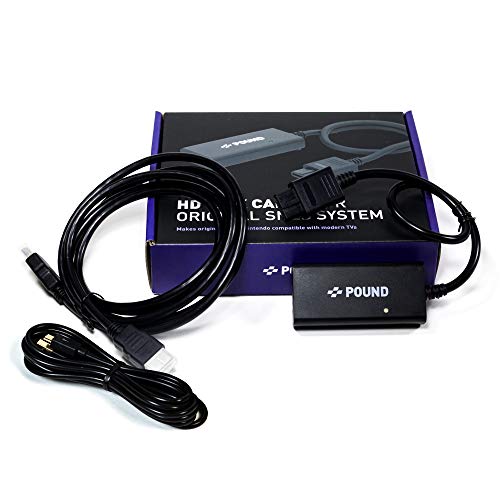
A single cable that plugs into an original SNES and outputs HDMI directly. No external box, no power supply, no configuration. Image quality beats generic composite adapters because it taps the console's RGB signal, and it costs under $30. The no-friction first display upgrade for SNES collectors.
What we like
Plugs directly into original SNES; no box or power supply needed
Better image than composite adapters; taps the SNES RGB signal
Under $30; the cheapest worthwhile display upgrade for SNES
What to know
SNES only; does not work with N64, GameCube, or any other console
No scanline filters or scaling options for purists
If you have a composite-output console (yellow/red/white cables) and just want to play on a modern TV without spending much, this does the job. Image quality is noticeably softer than the Pound cable, but it works with every retro console ever made. Under $20.
What we like
Works with every console that has composite output, which is nearly all of them
Under $20; zero commitment while you figure out your display setup
What to know
Noticeably soft and blurry; 240p content looks worse than on a CRT
Some units introduce slight audio delay on certain TVs
The most accessible RetroTink upscaler and a genuine step up from both composite adapters and console-specific HDMI cables. Accepts composite, S-Video, and component input from any retro console and outputs clean 480p/720p/1080p. Simple setup: plug in, select your input, play. The standard recommendation for collectors who want real image quality without complex configuration.
What we like
Accepts composite, S-Video, and component from any retro console
Simple plug-and-play setup with no complex configuration menus
Real image quality step up from both composite boxes and console cables
What to know
Outputs 480p, not 1080p; upgrade to RetroTink-5X for higher resolution
More expensive than generic adapters; worth it, but commit to the hobby first
Every cartridge you buy used needs cleaning before it goes in your console. Dirty contacts cause games to crash, show garbled graphics, or not load at all. Ninety percent of broken-seeming retro games are just dirty. A bottle of high-purity isopropyl alcohol and some cotton swabs will solve most problems. DeoxIT is the next step for stubborn contacts in controller ports and cartridge slots.
Best starter
MG Chemicals
99.9% Isopropyl Alcohol
$21.99 as of Jun 22, 2026
★★★★★Our rating· In Stock
99.9% purity IPA is the gold standard for cleaning cartridge contacts, PCBs, and controller ports. Evaporates completely, leaves no residue, and is safe for all retro hardware. Apply with a cotton swab, let dry 30 seconds, and you're done. Buy one bottle and clean everything you find.
What we like
99.9% purity evaporates clean with zero residue on PCBs or contacts
Fixes most broken carts; dirty contacts cause 90% of loading failures
Works on cartridges, controller ports, boards, and optical drives
What to know
Flammable; store away from heat sources and open flames
Doesn't fix physically bent pins or deep corrosion
When IPA alone isn't enough, DeoxIT is the next step. It chemically removes oxidation from metal contacts and leaves a thin protective film that prevents re-oxidation. The go-to for stubborn controller ports, cartridge connectors, and power jacks that still misbehave after a proper IPA cleaning.
What we like
Removes oxidation that IPA can't touch; the fix for stubborn connections
Leaves anti-oxidation film to keep contacts clean longer
Works on power jacks, cartridge slots, and controller ports
What to know
Excess residue needs IPA follow-up to remove; use sparingly
Overkill for most cartridge cleaning; IPA handles 90% of cases
Includes cleaning cards and fluid designed specifically for retro cartridge contacts. The cleaning card reaches the full contact strip width in NES, SNES, and Genesis carts better than a cotton swab can. Good kit if you want everything assembled for you rather than sourcing IPA and swabs separately.
What we like
Shaped tool reaches the full contact strip without cotton fuzz
Everything in one kit; no separate sourcing required
What to know
Proprietary solution; you'll run out and need IPA anyway
Less versatile than a bottle of 99.9% IPA for non-cartridge cleaning
Cartridges without protective cases develop scratched labels and bent contacts over time. A small collection can live in a shoebox, but once you hit 30-50 games proper storage pays off: you can find what you want to play, and you protect your investment. Display shelves serve a practical function too: games you can see are games you actually play.
Best starter
Mediaxpo
Universal Game Cartridge Cases (50-pack)
$75.95 as of Jun 22, 2026
★★★★★Our rating· In Stock
Clear plastic sleeves that fit over SNES, Genesis, and N64 cartridges to protect labels and contacts. A 50-pack runs under $20 and covers a starter collection twice over. Slip a cart in when you buy it and you'll never worry about label damage again.
What we like
Clear plastic shows label through the sleeve; no blind guessing
Under $20 for 50 sleeves; protects your whole starter collection
What to know
Sleeves add bulk; some storage solutions don't fit sleeved carts
Fit varies by console; check sizing before buying in bulk
Cordless illuminated acrylic shelf that mounts to the wall and displays cartridges upright so you can read every label at a glance. Built-in LED lighting turns the collection into room decor without running a power cord to the shelf. Two shelves hold a solid starter collection and the setup genuinely transforms a box of games into something worth showing people.
What we like
Cartridges displayed upright so every label is readable at a glance
LED backlighting turns the shelf into legitimate room decor
What to know
Requires wall mounting; measure stud spacing before ordering
LED needs a nearby outlet; factor cable management into placement
Most beginners buy the wrong thing first and spend the next month untangling it. Here's the order that actually makes sense: system, display, cleaning, then collecting.
Retro gaming has a beginner problem. There are decades of forums, YouTube rabbit holes, and collector lore between you and the thing you actually want to do, which is sit on a couch and play a 30-year-old game that you remember or always meant to play. This guide cuts straight to the practical stuff: what to do first, in what order, and what to ignore until month two.
Week one: Pick a system, one system
Before you buy anything, decide which era and which console. This is the decision most beginners skip, and it’s why they end up with a pile of games across five platforms and no real collection of anything.
The honest framework:
16-bit (SNES or Genesis, 1989-1996) is where most people should start. The libraries are enormous, hardware is cheap and reliable, common games cost $5-20 at thrift stores, and the games hold up genuinely well. SNES leans toward RPGs, platformers, and Nintendo exclusives. Genesis has a broader action library and more sports titles. Neither is wrong. Pick the one whose exclusives interest you more and start there.
5th generation (PlayStation 1, 1994-2000) is the other strong entry. The PS1 library is massive and games are still cheap. A lot of people start here because it’s the first console they remember as kids.
N64 is a trap for budget-conscious beginners. Hardware is plentiful, but the game prices have climbed sharply. Common titles cost $30-50 where comparable SNES or Genesis games cost $10-15.
6th generation (PS2, GameCube, Dreamcast) is a valid entry if you grew up with those systems. PS2 has the largest library of any console ever made. The tradeoff is that these systems are recent enough that thrift stores haven’t flooded with them yet, so you’re mostly shopping eBay at market prices.
Once you’ve picked your system, your next job is to find the hardware locally before you spend Amazon money on it. Facebook Marketplace, Goodwill, local game stores, and garage sales will get you a working console for $30-60. Amazon will charge you twice that for a third-party listing. Check PriceCharting before you buy anything to know what it’s actually worth.
Week two: Solve the display problem
Retro consoles output analog video signals. Your TV wants HDMI. Connecting them is a one-time decision that shapes how every game looks for as long as you keep the hobby, so it’s worth doing right.
The options, from simplest to best:
Pound Technology HDMI Link Cable (~$25): If you bought a SNES, N64, or GameCube, start here. It’s a single cable that plugs into the console and outputs HDMI with noticeably better image quality than composite adapters. Zero configuration required.
Generic composite-to-HDMI adapter (~$15): If your console only outputs composite (the yellow/red/white cables), this is the $15 box that gets you playing. The image is soft and colors bleed a little. It’s fine for getting started; you’ll upgrade when it bothers you enough.
RetroTink-5X Pro (~$250): This is what the community converged on as the best all-around upscaler. It accepts every signal type, outputs 1080p, adds correct scanline emulation, and has near-zero input lag. The image is indistinguishable from a good CRT at normal viewing distance. Don’t buy it in week two. Buy it after six months when you know you’re committed.
The CRT option is real and genuinely excellent. Original hardware looks exactly right on a CRT: zero input lag, correct aspect ratio, natural scanlines, no configuration. Free or nearly free CRTs appear constantly on Facebook Marketplace. The tradeoff is size, weight, and the fact that you need a second TV in your setup. Revisit this option after month one.
Week three: Learn to clean before you play
Every cartridge you buy used is dirty. Not dirty as in cosmetically rough, but dirty as in the contact strip at the bottom of the cart has oxidation, dust, and 30 years of skin oils on it. Dirty contacts cause games to not load, crash mid-play, or show garbled graphics. This isn’t the cartridge failing; it’s the connection failing.
The fix is a cotton swab and 99.9% isopropyl alcohol. Not 70% from the pharmacy. Not rubbing alcohol. 99.9% IPA, which evaporates completely and leaves no residue.
The cleaning process takes 30 seconds:
Dip a cotton swab in IPA.
Rub it firmly across the contact strip at the bottom of the cart, both sides.
Let it dry for 30 seconds.
Try the game.
This fixes the vast majority of games that seem broken. Before you conclude a game is dead, clean it twice with fresh swabs. It’s remarkable how often “broken” carts are just filthy.
For stubborn contacts on controller ports and cartridge slots, DeoxIT D5 is the next level up. It chemically removes oxidation that IPA can’t touch. Use it sparingly (a tiny drop) and follow it with an IPA wipe to remove excess.
Week four: Start collecting with intention
You have a working console, a display solution, and a cleaning kit. Now you can actually start hunting.
A few things that make the first month’s buying better:
Set a price ceiling before you walk in the door. PriceCharting updates daily with completed eBay sales. Before any thrift run, know what the titles you’re looking for should cost. Thrift stores are increasingly aware of game prices; don’t assume a thrift store price is automatically a deal.
Loose cartridges over complete-in-box to start. A complete-in-box (CIB) copy of a common SNES game costs 3-5x what the cartridge alone costs. The box and manual don’t change how the game plays. Build your playing library in loose carts first; collect boxed copies of games that matter to you specifically later.
Learn to spot reproductions. Reproduction carts are copies of games on replacement PCBs, sold as original. They’re not inherently bad (many people use them deliberately), but you shouldn’t pay original prices for them. The tells: regular Phillips screws instead of tri-wing screws on Nintendo carts, bare green PCB with no chip markings when you open it, and label printing that looks slightly off in color or font. For expensive games ($30+), open it before paying.
Join the community. r/gamecollecting’s weekly haul threads calibrate your expectations for what games cost in different regions. People post their finds with prices; you learn quickly what’s a deal and what isn’t. The sub also has active trade threads if you want to move duplicates.
What month two looks like
If you’ve made it through a month with one console, a working display setup, and a small collection of games you actually want to play, you’re no longer a beginner. A few things will start calling to you in month two:
An Everdrive or flash cart. These load an entire system’s library from an SD card on original hardware. Immensely useful for exploring the full library before committing to specific games. Wait until you know the system well enough to have opinions.
RGB video output. Once you’ve seen what a good upscaler does to a 16-bit game, composite video looks noticeably worse. The RetroTink-5X is the community standard for a reason; buy it when the image quality genuinely bothers you.
A second system. After a month with SNES, Genesis starts sounding interesting. This is the natural progression. Just make sure you’ve built a real collection on system one before splitting your attention.
Save your money
What you don't need yet
Beginners get pressured to buy a lot of stuff that doesn't help them play
better. Here's what we'd skip on day one.
An RGB-modded console — RGB mods improve image quality but cost $100-200 in parts and labor. Start with a composite adapter and upgrade when image quality actually bothers you.
Complete-in-box copies — CIB games cost 3-5x more than loose cartridges. Play loose games first; collect boxed copies later if presentation matters to you.
A soldering station — Most retro hardware repairs need only cleaning and contact work. Buy a cheap iron if you ever need one; a $200 Hakko is overkill unless you're doing chip-level repairs.
Everdrives and flash carts — Flash carts let you play an entire system's library from an SD card. Incredibly useful once you know the system well. Buy them after 6 months, not day one.
Multiple systems at once — Pick one system and build a real collection. Splitting attention across NES, SNES, and Genesis simultaneously means you never get deep into any of them.
Graded games (WATA or VGA) — Professionally graded sealed games are speculative investments with nothing to do with actually playing retro games. Ignore this market entirely until you're deep in the hobby.
First week
Your first seven days
A short, real plan to get from gear-on-doorstep to actually playing.
Pick your system. SNES or Genesis for 16-bit; PS1 for 5th gen on a budget; PS2 if you want the biggest possible library. · Action
Check local thrift stores, Goodwill, and Facebook Marketplace for hardware before Amazon. You'll save 30-60% on the console itself. · Action
Order cleaning supplies so they arrive before your first cartridges do. · Buy
Look up prices on PriceCharting before you buy anything. Thrift stores are increasingly price-aware. · Learn
PriceCharting · The standard database for retro game prices, updated from completed eBay sales
Clean every cartridge you buy before it goes in the console. IPA and a cotton swab, every single time. · Action
Join r/gamecollecting and browse the weekly haul threads to calibrate prices in your area. · Learn
r/gamecollecting · Active subreddit with price checks, haul threads, and trade forums
Set a monthly budget before you start thrifting. The first wave of finds is intoxicating and the spending adds up fast. · Action
FAQ
Common questions
Where should I actually buy retro games and hardware?
In this order: local thrift stores (hit-or-miss but cheapest), Facebook Marketplace (negotiable, local pickup), eBay (widest selection, market price), and video game stores with retro sections. Amazon is usually overpriced for original hardware. Always check PriceCharting.com before buying anything expensive.
Do I need a CRT TV to enjoy retro games?
No, but it helps. A CRT has zero input lag, correct aspect ratio, and natural scanlines that make 16-bit games look exactly as intended. A good upscaler on a modern TV is genuinely good and much easier. Start with an upscaler; revisit CRTs after 6 months if image quality matters to you.
How do I know if a cartridge is authentic or a reproduction?
Weight, screw type, and PCB. Real Nintendo carts use tri-wing screws (not Phillips); reproductions often use regular screws. Open the cart and look at the board: authentic boards have clean silk-screen printing and chip branding. Reproductions usually have bare green PCBs with no markings. For expensive games, always open and inspect before paying.
What's the best first system for someone new to retro collecting?
SNES or Sega Genesis. The libraries are massive, hardware is cheap and reliable, games are plentiful at thrift stores, and common titles cost $5-20. Both systems have strong communities and decades of documentation. SNES if you lean toward RPGs and platformers; Genesis if you want action games and a broader sports library.
Are retro games a good investment?
Common games are not. Rare games that were always rare have appreciated, but most collecting returns less than index funds. The right reason to collect retro games is because you love playing them or curating a meaningful personal library. Collecting to flip is how you end up with 800 games and no real satisfaction.
How do I know what a game is worth before I buy it?
PriceCharting.com tracks completed eBay sales for every retro game and platform. Check the loose price (cart only), complete price (cart plus box plus manual), and new price (sealed). Always check before buying something pricey. Thrift stores are increasingly aware of game values; don't assume a thrift price is a deal.
PriceCharting — The standard price database for retro games, updated from completed eBay sales. Check before buying or selling anything.
r/gamecollecting — Active subreddit for collectors. Weekly haul threads, price checks, trades, and discussion. Good signal on current market trends.
RetroRGB — The definitive guide to getting the best video output from every retro console. Upscaler reviews, RGB mod guides, and console-specific wiring documentation.
My Life in Gaming (YouTube) — The best deep-dive channel on retro display tech, upscalers, and getting accurate video from original hardware. Essential viewing before buying an upscaler.
Gaming Historian (YouTube) — Long-form documentary history of specific games and consoles. Essential context for why certain games are valuable and culturally significant.
Hard4Games (YouTube) — Collecting guides, authentication tips, and deep dives on rare games. Strong content on spotting reproductions and understanding regional variants.
Digital Press — Long-running collector resource with rarity guides, variant documentation, and active community forums.
As an Amazon Associate, JustBeginning earns from qualifying purchases.
We may also earn commission from other affiliate programs linked on this
page. Editorial recommendations are independent; we don't choose
products based on commission rates.
Product prices and availability are accurate as of the date and time
indicated and are subject to change. Any price and availability
information shown on Amazon at the time of purchase will apply.

 Best starter