Retro PC building sits at the intersection of tech history and hands-on restoration. Whether you're chasing the perfect DOS gaming rig or the Windows 98 machine of your childhood, the barrier to entry is lower than you think, if you know where to look and what to prioritize. The hard parts aren't the parts themselves.
By Colin B. · Published June 11, 2026 · Last reviewed June 11, 2026
A functional retro PC setup runs $150-450 depending on era and condition. Win9x-era Pentium machines are the sweet spot for price and software availability right now.
We earn commission on qualifying Amazon purchases — see our
affiliate disclosure.
Price tiers and budget totals shown above are editorial estimates;
actual Amazon prices vary.
At a glance
Our top pick in each category
The fastest path through this guide — each best-starter pick by category.
Scroll for the budget and upgrade alternatives.
Pick your era before you buy anything. DOS-era (286/386/486) is the authentic 80s and early-90s gaming experience: AdLib FM music, EGA graphics, command-line everything. Win9x era (Pentium through Pentium II) is the sweet spot for most people: CD-ROM multimedia, Sound Blaster 16, the games you actually remember from childhood. The Y2K era (Pentium III through Athlon, Windows ME and 2000) adds 3D acceleration but the line between 'retro' and 'just old' starts to blur.
Your base machine comes from eBay, Craigslist, estate sales, or local thrift stores. Search eBay for 'Pentium II desktop' or '486 computer' with a $50-150 budget. Avoid 'powers on but not tested further.' Tested-working listings are worth the premium. This is one hobby where local pickup saves you money and prevents damage in shipping.
The original hard drive is the most likely component to fail in any vintage PC. Replacing it with a CompactFlash card via a $15 IDE adapter is the first thing you should do to any machine you acquire. Silent, fast, and immune to the head crashes that kill 30-year-old spinning disks.
Vintage hard drives fail. They're 25-40 years old, they have moving parts, and their lubricants dried out a decade ago. Replacing the original HDD with a solid-state solution via an IDE adapter is the single most transformative upgrade you can make, and the first thing you should do with any machine you acquire. Two main approaches: CompactFlash cards (the gold standard, maximum compatibility) or SD cards (cheaper, slightly fussier about older BIOSes). If your 3.5" floppy drive is also dead or you want to load software from USB, add a GoTek floppy emulator.
Storage Upgrades — what's the difference?
A few common shapes, each making a different trade.
CF-to-IDE
Most compatible solid-state HDD replacement. The safe default.
Interface
40-pin desktop or 44-pin laptop
Capacity
4GB-128GB CF cards
Compatibility
Works on virtually every IDE board
Best for Any era from 286 through early 2000s; especially reliable on pre-1995 BIOSes
Tradeoff CF cards slightly more expensive and less available at local stores than SD
CompactFlash cards use the same electrical interface as IDE hard drives, so they're native, not emulating anything. This 40-pin desktop adapter plugs directly into your motherboard's IDE header. Pair it with a 4GB or 8GB CF card (SanDisk or Transcend Industrial are the reliable choices) and your vintage PC has a silent, fast system drive that will outlast everything around it.
What we like
CompactFlash is native IDE: no translation layer, maximum compatibility
Silent, no moving parts, immune to head crashes on power cycling
Under $20 with a 4GB CF card; highest-value upgrade in the hobby
What to know
Still needs master/slave jumper setting on adapter; check your board docs
CF cards harder to find than SD at brick-and-mortar stores
SD cards are cheaper and easier to find than CompactFlash, but they use a different protocol (the adapter translates). Works on the vast majority of 486 and Pentium boards, but a small number of older BIOSes have trouble with the translation layer. Legitimate starting point on a tight budget; just know CF is safer if you hit weirdness.
What we like
SD cards are everywhere and cheap; a 16GB card costs under $8
Works on the vast majority of 486 and Pentium machines without issues
What to know
Translation layer causes rare but hard-to-diagnose BIOS compatibility issues
Slightly slower write speeds than CF on some boards
A GoTek replaces your machine's 3.5" floppy drive with a USB slot. Flash it with the free FlashFloppy firmware (10-minute process) and you can load any disk image from a USB stick: every piece of DOS shareware, every BBS archive, every game you have ever wanted to try. If your floppy drive is dead (and it is), this is the upgrade you install the day your machine arrives.
What we like
Runs any .img floppy image from USB; the entire DOS software library accessible
Fits the standard 3.5" drive bay with no chassis modification needed
FlashFloppy firmware is free and has clear installation documentation
What to know
Requires firmware flashing first; stock firmware is severely limited
OLED display upgrade (sold separately) is nearly mandatory for usability
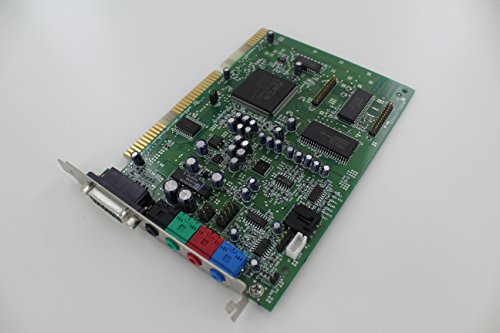
For DOS and early Win9x gaming, audio quality depends on FM synthesis, not speaker quality. The Sound Blaster line from Creative Labs dominated the era: the AWE32 and AWE64 are the most coveted for their on-board RAM and wavetable synthesis, while the SB16 covers 95% of DOS games at a lower price. ISA cards (the black 16-bit slots) are required for Sound Blasters; verify your board has them before hunting. For Win9x-era PCI machines, Sound Blaster Live! and Audigy cards are abundant and well-supported. The Roland SC-55 is the external MIDI module game composers actually scored to.
Best starter
Creative Labs
Creative Sound Blaster AWE64 ISA Card
$115.00 as of Jun 22, 2026
★★★★★Our rating· Only 1 left in stock - order soon.
The AWE64 is the sweet spot of the Sound Blaster ISA line: OPL3 FM synthesis, 16-bit audio, and Creative's wavetable engine at a price that doesn't require a second mortgage. It's the card that made DOS game audio sound like it should. Find one in working condition and buy it without hesitation. eBay is your primary source; $30-80 is a fair price for a clean board.
What we like
OPL3 FM synthesis plays DOS game music the way composers intended
Compatible with every DOS game that supports Sound Blaster
Wavetable engine adds richer MIDI than FM synthesis alone
What to know
ISA only: won't work in machines without ISA slots (post-1999 mostly)
eBay condition varies; inspect for capacitor leakage before buying
★★★★☆Our rating· Only 1 left in stock - order soon.
If your machine is Win9x-era or later with PCI slots instead of ISA, the Sound Blaster Live! is abundant and cheap. Cards show up constantly at thrift stores and eBay for $5-20. No authentic OPL3 FM synthesis (PCI SBs use software emulation for DOS FM), but for Windows gaming, CD audio, and DirectX sound they're excellent.
What we like
PCI is far more common than ISA in post-1997 Win9x machines
Often under $15 on eBay; sometimes free at Goodwill
Rock-solid Win9x driver support for DirectX and CD audio
What to know
Software OPL emulation doesn't capture the character of real FM synthesis
Not ideal for authentic DOS gaming; want ISA for that
The Roland SC-8850 is the flagship Sound Canvas module, backward-compatible with the SC-55 GS MIDI standard that 90s game composers scored to. Sierra adventures, LucasArts titles, and X-COM sound unmistakably right on a Sound Canvas; the SC-8850 plays those MIDI files with higher-quality samples than the original SC-55. External module, works with any PC that has a MIDI interface.
What we like
Backward-compatible with SC-55 GS MIDI standard game composers scored to
External module works with any PC era via MIDI, not locked to ISA or PCI
Higher-quality samples than original SC-55; the definitive Sound Canvas
What to know
Expensive ($300-600 used) and requires a separate MIDI interface
Overkill until you're deep into games with elaborate MIDI soundtracks
For a DOS or Win9x build, the keyboard is one of the most tactile parts of the experience. IBM's Model M buckling-spring keyboard, introduced in 1985 and still in production via Unicomp, is the benchmark. Originals show up regularly on eBay for $20-80 depending on condition. AT keyboards (5-pin DIN) need a PS/2 adapter to connect to later machines; PS/2 keyboards connect directly to period-accurate boards. If you're using a vintage keyboard on a modern machine, add a PS/2-to-USB adapter.
Best starter
Unicomp
Ultra Classic Buckling Spring Keyboard
$$$
★★★★★Our rating
Unicomp bought IBM's keyboard tooling and still makes new Model M buckling-spring keyboards in Lexington, Kentucky. Same mechanism, same tactile feedback, modern USB connection. It's the only new keyboard that is authentically a Model M, not a clone or approximation. If you want the iconic IBM typing experience without hunting eBay for a 35-year-old board, this is the answer.
What we like
Made on original IBM tooling: this is the real Model M mechanism
USB connection works on modern and vintage machines via USB-to-PS/2 adapter
Buckling spring mechanism outlasts any membrane keyboard by decades
What to know
Very loud; unsuitable for shared spaces or anyone who values social harmony
Premium price ($105+) for a keyboard with zero ergonomic pretensions
If you want to use a vintage PS/2 keyboard or mouse on a modern machine (or a modern machine as a KVM for your vintage PC), this passive adapter does it cleanly. Keep one in your parts bin. You will need it.
What we like
Lets any vintage PS/2 keyboard or mouse work on a modern USB machine
Passive design: no power, no latency, no drivers
What to know
Some keyboards (notably later-model Model Ms) require powered PS/2; verify
Every vintage PC needs a cleaning pass before use. Decades of dust pack into heatsinks, capacitors leak and fail, CMOS batteries die, and original thermal compound has long since hardened. The good news: restoration tools are cheap and the techniques are well-documented. Budget 30-60 minutes for a clean-and-inspect on any machine you acquire. Doing this step before first power-on saves you from the most common causes of 'it doesn't work' and prevents turning a dormant problem into an active fire risk.
Best starter
MG Chemicals
99.9% Isopropyl Alcohol Electronics Cleaner
$21.99 as of Jun 22, 2026
★★★★★Our rating· In Stock
99% IPA is the primary cleaning fluid for electronics: it removes oxidation from contacts, dissolves thermal compound, and dries residue-free. The 99% concentration matters; 70% or 91% pharmacy-grade IPA has too much water for electronics work. MG Chemicals is the community standard. Keep a bottle and cotton swabs in your kit: they fix more issues than any other tool you own.
What we like
99% purity dries residue-free: essential for contact cleaning and cap leaks
Community standard; safe for virtually all PCB materials and coatings
Multi-use: cleans motherboards, IC sockets, keyboard contacts, and fans
What to know
Highly flammable; requires adequate ventilation during use
Cotton swabs consume quickly on a thorough board clean; buy in bulk
Compressed air removes dust without contact risk. Run a can through any vintage machine before powering on and you clear 90% of the heat-trap risk. Retro PC dust can include conductive debris from decades of oxidation: don't skip this step. Buy two cans; you'll use the first one completely on your first machine.
What we like
No residue, no contact risk; safest first step before board inspection
Works on fans, heatsinks, PSU vents, and keyboard switches simultaneously
What to know
Cans run out faster than expected on seriously dusty vintage hardware
Hold upright; inverted cans spray propellant liquid that freezes PCB traces
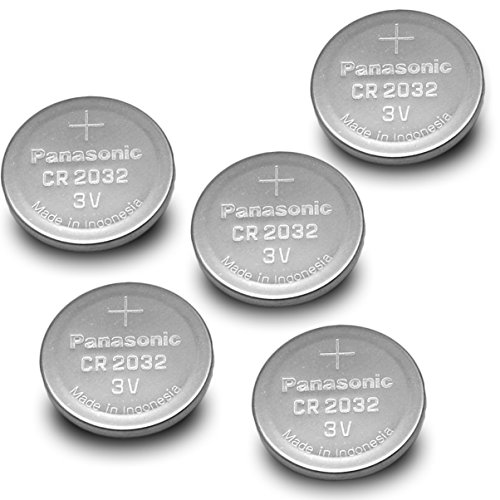
Every vintage PC has a CMOS battery (a CR2032 lithium coin cell) that maintains the BIOS clock and settings. After 10-30 years, that battery is flat or leaking. Symptoms: date resets to January 1980 on every boot, BIOS forgets settings, or the machine won't POST at all. A $1 battery swap fixes all three. Buy a 5-pack and keep one taped to every machine you own.
What we like
A $1 fix for 'date resets every boot' and 'BIOS won't save settings'
Universal across virtually every 286 through early-2000s PC motherboard
Easy to replace: pops out of its holder with no tools on most boards
What to know
Some boards solder the battery directly; desoldering required to replace
Leaked batteries that corroded PCB traces need more than just a swap
Electrolytic capacitors from the late 1990s and early 2000s fail notoriously: bulging tops, leaked electrolyte, and intermittent crashes on Socket 370 and Socket A boards especially. This 500-piece assortment covers the most common values for testing and basic repairs. For serious board recapping, buy individual Nichicon or Rubycon FM-grade capacitors matched to your board's exact spec.
What we like
Fixes the root cause of late-90s board instability permanently
500-piece assortment covers the most common values for quick repairs
Turns a crashing or unreliable board into a stable daily driver
Retro PC building starts with sourcing your first machine and ends with wanting a dozen more. Here is what actually happens in your first month, from hunting eBay to loading your first DOS game.
Retro PC building has a hook that most hobbies don’t: the moment your machine successfully POSTs for the first time and you hear that familiar beep, you feel like you’ve brought something back from the dead. That feeling is the entire point. Everything else in the hobby is in service of it.
Here is what your first month actually looks like, from picking an era to loading your first game.
Week 1: Choose your era, find your machine
The first decision you make determines everything else. Pick it deliberately.
DOS era (286/386/486, roughly 1985-1994) is the authentic command-line experience. You type commands, floppy drives clatter, and game audio is driven by FM synthesis on an AdLib or Sound Blaster card. The software library is vast and weird and free on Archive.org. The downside: these machines are increasingly hard to find in working condition, and the repair skills ceiling is high.
Win9x era (Pentium through Pentium II, 1994-1999) is where most people start, and for good reason. CD-ROM multimedia, the Sound Blaster 16, and the games most people actually remember from childhood all live here. Parts are abundant. eBay has hundreds of working machines at any given time in the $50-150 range. This is the sweet spot.
Y2K era (Pentium III through early Athlon, 1999-2002) adds early 3D acceleration with cards like the Voodoo 2 and GeForce 256. The line between “retro” and “just old” gets blurrier here, but if you grew up on Half-Life and Quake III, this is your era.
Once you’ve decided, start searching eBay. Filter by “tested working” and look for complete systems with photos of the POST screen or Windows loading. Avoid “powers on, not tested further.” The premium for tested machines is real and worth it.
Week 2: The machine arrives. Now the real work starts.
Before you plug anything in, inspect the board. Look for:
Bulging or leaking capacitors. Round-topped electrolytics on the motherboard should be flat on top. Any that look domed, cracked, or have brown residue around their base are failing. Capacitors from 1996-2002 are notoriously prone to this, especially on Socket 370 (Intel) and Socket A (AMD) boards.
A flat or missing CMOS battery. The CR2032 coin cell on the motherboard runs the BIOS clock and saves settings. After 10-30 years, it’s almost certainly dead. Replace it before first boot; it’s a $1 fix that prevents a confusing diagnostic.
Dust. Pack it in before you power anything on. Compressed air through the heatsink, PSU vents, and drive bays first.
Now clean the RAM sticks. Pull them out and wipe the gold contacts with a cotton swab dipped in 99% isopropyl alcohol. Bad RAM seating is responsible for more “dead” vintage PCs than any actual hardware failure. Reseat everything after cleaning.
Power on. You’re looking for a single short beep from the BIOS, then the memory count, then the drive detection sequence. If you see that, you’re in good shape. If you get continuous beeps or silence with no video, the diagnosis table on Vogons.org covers every beep code by BIOS manufacturer.
Week 2-3: Getting software running
The original hard drive is probably failing or already dead. Replace it now with a CF-to-IDE adapter and a CompactFlash card before you load anything valuable onto it. The swap takes 15 minutes and makes the machine dramatically more reliable.
For a DOS machine, the software path is straightforward: download FreeDOS as a bootable image, write it to the CF card with dd or Rufus, and boot. For Win9x, you’ll need a period-appropriate Windows 98 SE install disc. Archive.org has disc images; burning an ISO to a physical CD-ROM and booting from it is the authentic method.
The floppy drive situation: assume it doesn’t work. A GoTek USB floppy emulator, flashed with the free FlashFloppy firmware, replaces the dead floppy drive with a USB slot. Every piece of floppy-based software you want to run becomes a disk image file on a USB stick. This is not cheating; it’s how the community keeps these machines functional.
For sound: if you have a DOS machine with ISA slots, hunt eBay for a Sound Blaster 16. Configure it via its jumpers or software to I/O address 220, IRQ 5, DMA 1. That’s the combination virtually every DOS game expects. Get this right and game audio will work correctly without per-game configuration headaches.
Week 3-4: Games, configuration, and the community
The first time you boot a game that actually sounds right on real hardware, you understand why people do this. The OPL3 FM synthesis on a real Sound Blaster has a character that emulators approximate but don’t replicate: the slight warmth of the analog circuit, the way chords bloom across the speakers. If you grew up with this, it is immediately recognizable. If you didn’t, it sounds like a very particular kind of 1990s.
Getting games running from this era requires understanding a few DOS concepts that don’t exist in modern computing:
CONFIG.SYS and AUTOEXEC.BAT are the startup configuration files that load drivers and set the sound card environment variables. Every DOS game assumes these are set correctly.
Conventional memory is the first 640KB of RAM, and DOS games fight over it. EMM386 and HIMEM.SYS are memory managers that help. Getting enough free conventional memory to run demanding games is a legitimate skill that takes an afternoon to learn.
CD-ROM drivers must be loaded in CONFIG.SYS before you can access a CD-ROM drive. MSCDEX handles this.
Vogons.org has setup guides for virtually every game from this era. When something isn’t working, search there first.
The community is the part that keeps people in this hobby. Retro PC builders are generous with knowledge and hardware. Attending a Vintage Computer Federation swap meet, even once, puts you in a room with people who will give you hardware, teach you repair techniques, and tell you stories about what these machines meant when they were new.
What to do in month two
By the end of your first month, you have a working machine, some software running, and a developing list of things you want but don’t have yet. A few things sharpen the curve dramatically:
Pick a specific project. “Build a period-accurate Wing Commander II machine” is more motivating than “have a vintage PC.” The specificity drives the hardware decisions and gives you an end state to work toward.
Hang out on Vogons. The community troubleshooting database there is unmatched. Ask a specific question with your machine details and you’ll get useful answers within hours.
Attend a swap meet. VCFed expos are the best, but any local HAM radio flea market often has vintage computing equipment. Meeting people who share the hobby in person accelerates everything.
The machine you have now is probably not the machine you’ll want in six months. That’s fine. Retro PC building is fundamentally about accumulation and iteration. You’re not doing it wrong if you want another one.
Save your money
What you don't need yet
Beginners get pressured to buy a lot of stuff that doesn't help them play
better. Here's what we'd skip on day one.
A MiSTer FPGA system — MiSTer accurately emulates vintage computers in an FPGA. But emulation is the opposite of restoration. Learn what actual vintage hardware feels like before deciding you want to reproduce it in silicon.
An original IBM PC 5150 or XT — Beautiful artifacts, but ISA-only machines with CGA graphics and a 5.25" drive are a tough first build. Start with a 486 or Pentium where the software library is vast and parts are cheaper.
Period-accurate original software on physical media — Original diskettes and CD-ROMs are collectibles, not requirements. Archive.org and FreeDOS give you every piece of software you need to get started. Buy physical media after you love the hobby.
A logic analyzer or oscilloscope — Useful for advanced fault diagnosis. Overkill for 90% of retro PC problems, which are solved by cleaning contacts, swapping RAM, and replacing the CMOS battery.
A Roland MT-32 MIDI module — Transforms 90s game music, but requires a MIDI interface and some configuration. Get a stable machine running first, then revisit once you know what you're actually playing.
First week
Your first seven days
A short, real plan to get from gear-on-doorstep to actually playing.
Decide your target era: DOS (286/386/486) for 80s command-line authenticity, Win9x (Pentium through PII) for the multimedia golden age, or Y2K (PIII/Athlon) for early 3D gaming. Everything downstream depends on this choice. · Action
Search eBay for your base machine. Filter by 'tested working' and look for complete systems. Budget $50-150 for a Win9x-era Pentium desktop in working condition. · Action
Join Vogons.org. It's the most comprehensive retro PC forum in existence: decades of troubleshooting threads, driver archives, and compatibility lists. Search before posting; your question has been answered. · Action
Vogons.org · The retro PC community's primary home; search before posting
Download FreeDOS and browse the Internet Archive software library while you wait for hardware. FreeDOS is free, open-source, and compatible with nearly all DOS software. · Action
FreeDOS · Free, open-source, DOS-compatible OS; a good baseline to test with
Watch a few restoration videos on YouTube. The Serial Port and LGR are the best entry points for the retro PC world specifically. · Action
The Serial Port · Best technical vintage PC restoration and troubleshooting content
LGR · Lazy Game Reviews: vintage PC hardware, software, and culture with a collector's eye
FAQ
Common questions
Where do I actually find vintage PCs?
eBay is the easiest source with the widest selection. For better prices, try Craigslist, Facebook Marketplace, estate sales, and thrift stores. Vintage Computer Federation swap meets and local HAM radio flea markets are where you find the best deals from people who actually know what they're selling.
How do I know if a vintage PC is worth buying?
The best indicator is a 'tested working' listing with a POST video or Windows loading screenshot. Avoid 'powers on but no video' or 'untested.' Check the seller's feedback score and look for photos showing the motherboard, RAM, and drive bays. Inspect for obvious capacitor bulge or leakage on the motherboard.
Do the original hard drives still work?
Sometimes, but don't count on it. Hard drives from the 80s and 90s have dried lubricants, weakened head actuators, and 30-year-old magnetic media. The first thing you should do with any vintage PC is replace the HDD with a CF-to-IDE adapter. It's $15 insurance that makes the machine far more reliable.
Is using old software legal?
It depends. FreeDOS is fully open-source and always legal. Many classic games are now freeware (id Software, Epic Games, and others have released their 90s catalogs). Archive.org hosts thousands of titles under a preservation argument. Strictly speaking, commercial software you didn't license is still copyrighted, but enforcement against personal preservation use is essentially nonexistent for titles 20+ years old.
Do I need a real CRT or can I use a modern monitor?
You can start with a VGA-to-HDMI adapter and a modern monitor, and it works fine for Win9x and later. For DOS-era gaming at authentic resolutions (320x200, 640x350), a real CRT eventually becomes necessary: many vintage video modes simply won't output on modern monitors, and even where they do, the aesthetic is noticeably wrong without scanlines and phosphor bloom.
What's the difference between ISA, PCI, and AGP slots?
These are the expansion card interfaces that evolved across PC history. ISA (Industry Standard Architecture) is the older 16-bit black slots on 286 through mid-Pentium boards, required for vintage Sound Blasters and most period expansion cards. PCI (Peripheral Component Interconnect) replaced ISA starting around 1993 and appears as white slots. AGP is a graphics-only slot, starting around 1997. Which slots your motherboard has determines which sound and expansion cards will work.
How much does a complete retro PC setup cost to put together?
A working Win9x gaming PC runs $50-150 on eBay. Add a CF-to-IDE adapter ($15), a Sound Blaster 16 ($20-50), and a CRT from Craigslist ($0-30) and you're at $85-245 for a fully authentic setup. Vintage keyboard ($30-80), restoration supplies ($20), and the GoTek floppy emulator ($25) put the total complete setup at $160-375.
Vogons.org — The retro PC community's primary forum. Decades of troubleshooting threads, driver archives, hardware compatibility lists, and a massive software repository. Search here before posting; your question has been answered.
Vintage Computer Federation — Non-profit that organizes swap meets and preservation efforts. Their annual East and West expos are the best places to buy hardware in person and meet experts. The forums are active and welcoming.
Internet Archive Software Library — Thousands of legally archived DOS and early Windows programs. The MS-DOS games section alone has more titles than any collector will get through. Your first stop for software.
FreeDOS Project — Open-source, DOS-compatible operating system. Free to use, actively maintained, compatible with most vintage DOS software. Use it to test your hardware setup before hunting for period-appropriate OS media.
The Serial Port (YouTube) — The most technically thorough vintage PC restoration and troubleshooting channel. Capacitor recapping guides, BIOS chip tutorials, and deep dives into ISA sound card configuration. Watch before you break something.
LGR (YouTube) — Lazy Game Reviews covers vintage PC hardware, software, and culture with a collector's perspective. Excellent for understanding which machines and games are significant in the retro PC world.
Phil's Computer Lab (YouTube) — Beginner-accessible DOS gaming setup tutorials. His series on building a period-accurate DOS PC is the clearest introduction to the hobby for newcomers.
As an Amazon Associate, JustBeginning earns from qualifying purchases.
We may also earn commission from other affiliate programs linked on this
page. Editorial recommendations are independent; we don't choose
products based on commission rates.
Product prices and availability are accurate as of the date and time
indicated and are subject to change. Any price and availability
information shown on Amazon at the time of purchase will apply.
Our top pickStarTech 40-Pin IDE to CompactFlash Adapter


 Best starter