A home sim is a room project first. Ceiling height, width and depth decide which launch monitor works, and a $500 radar unit with a good net teaches you more than a $15,000 bay you rushed. Here's how to measure, what the realistic $1k, $5k and $15k builds look like, and what to buy first.
By Colin B. · Published November 16, 2026 · Last reviewed November 16, 2026
The $1,000 build is a Garmin R10, a Spornia SPG-7 net and a GoSports mat, using a phone or tablet as the screen. A full bay with a SkyTrak ST MAX, the GoSports enclosure, a BenQ short-throw projector and a SIGPRO mat is about $4,300 before software and a computer.
We earn commission when you buy through links on this page, including
Amazon. See our affiliate disclosure.
Price tiers and budget totals shown above are editorial estimates;
actual prices vary.
At a glance
Our top pick in each category
The fastest path through this guide — each best-starter pick by category.
Scroll for the budget and upgrade alternatives.
Measure before anything else. Swing your driver in the room. You want about 9 feet of ceiling (10 is comfortable), 10 to 15 feet of width, and 15 to 20 feet of depth for radar launch monitors that sit behind you. Camera units that sit beside the ball can work in 12 to 14 feet.
Know the three real budgets. About $1,000 gets a radar launch monitor, a net and a basic mat, with your phone or tablet as the screen. About $5,000 adds an enclosure, impact screen, short-throw projector and a better mat. $15,000 and up buys a photometric launch monitor like a Uneekor or Foresight, which most people don't need to start.
Budget for software. Many launch monitors need a yearly membership for full course play or advanced data, on top of the hardware. Check what's included in the box before comparing prices.
The launch monitor is the heart of the sim: it measures ball speed, launch angle and spin, then predicts where the shot would have gone. Radar units like the Garmin R10 and Rapsodo sit 6 to 8 feet behind the ball and need a deep room, about 15 to 20 feet total. Camera units like SkyTrak sit beside the ball and work in shorter rooms. Check what software comes included and what needs a yearly subscription.
Launch monitors — what's the difference?
A few common shapes, each making a different trade.
Radar, behind the golfer
Cheaper and portable, works outdoors too, but needs a deep room to track the ball.
Typical price
$500 to $1,200
Room depth
About 15 to 20 feet
Best for Long garages and basements
Tradeoff Spin readings indoors can need metallic ball stickers
The launch monitor most home sim builders start with. It reports carry, ball speed, launch, spin and club path, works on the range or indoors, and plugs into popular simulator software. Full course play needs Garmin's Golf membership or third-party software. About $500. 1,100+ reviews at 4.1 stars.
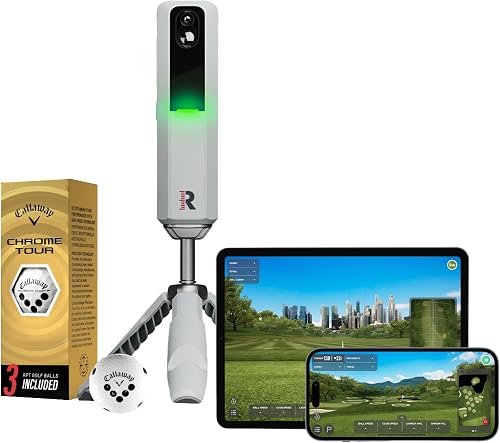
Uses radar plus two cameras, and records swing video of every shot, which is great for working on your swing. It comes with three Callaway Chrome Tour balls for spin readings indoors. Many features need Rapsodo's yearly membership. About $550. 575 reviews at 4.0 stars.
A camera-based unit that sits beside the ball and measures spin directly, so it works in shorter rooms where radar struggles. It includes a year of software. It's the step up before the $10,000+ overhead units. About $1,695.
A net is how most people start: it's cheaper than an enclosure and screen, moves easily, and lets you test the room. Look for a steel frame, a size of at least 7 by 7 feet, and side barriers or wings that catch mis-hits. A net that returns the ball to you saves a lot of walking. Leave a foot or more of space behind the net so balls don't hit the wall.
Best starter
Spornia
SPG-7 Golf Practice Net with Ball Return
$349.99 as of Nov 16, 2026
★★★★★Our rating· In Stock
A 7-foot net with a steel frame, side barriers and an automatic ball return that rolls balls back to you. It sets up and folds down in minutes, so it works in a garage you also park in. About $350. 780+ reviews at 4.5 stars.
A larger, heavier steel-frame net with a deeper pocket for full driver swings and a target face. A good choice if you'll practice for years before building a full bay. About $500. 300+ reviews at 4.5 stars.
An enclosure surrounds the hitting area with netting and holds an impact screen you can project onto. It's the step that makes a sim feel like golf. Measure first: most kits are about 10 feet wide and 8 feet tall, and you want a little room on every side. Check the screen is made for golf (layered and textured to stop bounce-back) and buy a kit that matches your room's height.
Best starter
GoSports
Golf Simulator Enclosure, Complete Set with Frame and Impact Screen
$999.99 as of Nov 16, 2026
★★★★★Our rating· In Stock
A complete kit with frame, side and top netting and an HD impact screen, from a brand that also makes popular nets and mats. It's the most-reviewed enclosure kit on Amazon and a solid base for a projector bay. About $1,000. 180+ reviews at 4.5 stars.
Golf Simulator Enclosure Kit, 10 x 8 ft with Impact Screen
$599.00 as of Nov 16, 2026
★★★★☆Our rating· In Stock
A cheaper 10 by 8 foot enclosure with a 4K-ready impact screen, for rooms that fit that footprint. Fewer owners have reviewed it so far, so check the frame dimensions against your space. About $599.
A good mat protects your joints and lets the club slide through like grass. Cheap, thin mats on concrete jar your wrists and teach you to hit down too little. Look for a thick foam base and a turf top that lets you strike slightly behind the ball without bouncing. A 5 by 4 foot mat or larger gives room to stand on, and a separate stance mat is fine.
Best starter
GoSports
Elite Golf Hitting Mat
$149.99 as of Nov 16, 2026
★★★★★Our rating· In Stock
A thick turf mat with a foam base that's kind to your wrists on concrete and holds a real tee. It's the best-reviewed mid-price mat, and comes in sizes up to a full stance-and-hit mat. About $150. 3,600+ reviews at 4.6 stars.
A favorite of serious home builders: a soft, grass-like strip that lets the club dig a little and gives honest feedback on fat shots, with replaceable hitting strips. About $750. 4.8 stars from a small number of reviews.
Golf sims need a short-throw projector: one that fills a 10 foot screen from only 5 or 6 feet away, mounted overhead so your shadow stays off the image. Brightness matters more than 4K, especially in a garage with some light. Check the throw ratio against your room using the maker's calculator before buying, and plan for a ceiling mount and a long HDMI cable to your computer.
Best starter
BenQ
TH671ST 1080p Short Throw Projector
$849.00 as of Nov 16, 2026
★★★★★Our rating· In Stock
A bright, 3,000-lumen 1080p short-throw projector that has long been a go-to for golf sims. It throws a big image from close range and keeps input lag low, so shots appear right away. About $849. 680+ reviews at 4.4 stars.
A compact 1080p laser projector with a very short throw. The laser light source lasts far longer than a lamp and holds its brightness over the years. About $1,000. 120+ reviews at 4.1 stars.
A home sim is a room project before it's a golf project. Measure first, start with a launch monitor and a net, and add the screen and projector once you know the space works. Here's a month-by-month plan from tape measure to your first full round indoors.
The fastest way to waste money on a golf sim is to buy the screen before you’ve swung a driver in the room. Do it in this order and every purchase is checked before the next one.
Week 1: Measure the room, then swing in it
Get the longest club you’ll use (usually the driver) and take full, slow swings in the space. Hitting the ceiling on a practice swing is the test that matters. As a rough guide:
Ceiling: 9 feet works for most golfers under about 6 feet tall. 8 feet is tight, and many people hit irons only or swing flatter. 10 feet removes the worry.
Width: 10 feet is the minimum for a right-handed golfer standing off center. 12 to 15 feet lets lefties and righties share and lets you stand in the middle.
Depth: Radar units like the Garmin R10 and Rapsodo sit behind you and need room to see the ball fly, so plan on 15 to 20 feet total. Camera units that sit beside the ball, like SkyTrak, can work in about 12 to 14 feet.
Also check the floor (concrete is ideal under a mat) and that nothing breakable sits within a few feet of the hitting area. Mis-hits go sideways.
Start simple. A launch monitor, a sturdy net with side barriers and a good mat give you real numbers on every swing. Run the launch monitor’s own app on a phone or tablet at first; you don’t need paid simulator software to learn your carry distances.
Hit 20 balls with each club and write down the average carry. That chart alone will improve your scoring on the real course more than any simulated round. Use real golf balls, not foam: radar units need real ball flight, and some need small metallic stickers on the ball to read spin indoors.
Once you know the room works, upgrade the net to an impact screen and enclosure. Measure the screen size first, then pick a short-throw projector that can fill it from the distance you have. Mount it overhead and slightly in front of you, or high behind the hitting area, so your shadow stays off the image.
Then try simulator software. Most launch monitors include basic courses and ranges, and premium tiers or separate programs like GSPro and E6 Connect add full course play. Start a monthly plan before committing to a yearly one.
The sim makes it easy to just bash drivers. Better: warm up with wedges to specific distances, play a few holes, and finish with a “combine” or skills test in your software so you can track progress week to week. Ten focused minutes on 50 to 100 yard shots beats an hour of driver.
Need the gear? Our home golf simulator gear guide covers launch monitors, nets, screens, mats and projectors, with real budget tiers.
Save your money
What you don't need yet
Beginners get pressured to buy a lot of stuff that doesn't help them play
better. Here's what we'd skip on day one.
A $10,000+ photometric launch monitor — Overhead camera units are amazing, but a $500 to $1,000 monitor tells a beginner everything they need to improve.
A 4K projector — A golf screen is textured and viewed up close. A bright 1080p short-throw looks great on it.
Turf flooring for the whole room — Start with the hitting mat. Add turf around it once the bay is finished and you know you'll keep it.
A putting green add-on — Indoor putting on a sim is hit and miss. Practice short game outside and use the sim for full swings first.
First week
Your first seven days
A short, real plan to get from gear-on-doorstep to actually playing.
Swing your driver slowly in the room and check the ceiling, then measure width and depth. · Action
Choose a launch monitor that fits your room: radar for long rooms, a side-mounted camera unit for short ones. · Learn
Buy a launch monitor first and use it with a net and mat before buying a screen. · Buy
Nine feet works for most golfers under about 6 feet tall. At 8 feet many people can only hit irons, or have to change their swing. The real test is a slow full swing with your driver in the room. Remember the mat raises you an inch or so.
What's the cheapest setup that actually works?
A Garmin R10 or Rapsodo MLM2PRO, a net with side barriers and a basic mat, about $1,000 total. Use the monitor's app on a phone or tablet as your screen. You can add a projector and impact screen later without replacing anything.
Can I use foam or practice balls?
No, not with most launch monitors. Radar and camera units need real ball flight and spin, so use real golf balls. Some radar units, including the Garmin R10 and Rapsodo, read spin better indoors with small metallic dots stuck on the ball.
Do I need a projector?
Not to start. A phone, tablet or TV beside the net works fine for practice. A short-throw projector on an impact screen is what makes it feel like golf, and is the step most people take second.
Is a garage good for a golf sim?
Often the best spot, with high ceilings and concrete floors. Watch for very cold or hot temperatures (batteries and projectors dislike both), garage door tracks that lower the ceiling, and enough depth behind you for a radar unit.
GolfWRX forums: Golf Simulators — Long-running build threads with room measurements, photos and honest launch monitor comparisons from home builders.
GSPro — Popular, affordable simulator software with thousands of community-built courses. Check which launch monitors it supports.
r/Golfsimulator — Helpful community for room-size checks, projector throw math and budget builds. Search before posting; most questions have been answered.
JustBeginning earns commission from affiliate programs. As an Amazon
Associate, we earn from qualifying purchases. This costs you nothing
extra and doesn't change our recommendations.
Prices and availability are accurate as of the date and time
shown and can change; the price on Amazon when you buy is what
applies.
How this works.
Our top pickApproach R10 Portable Golf Launch Monitor


 Best starter