Meshtastic turns a $30 to $60 radio into a phone accessory that texts with no cell service and no license. Radios relay for each other, so a few nodes cover a campsite, a festival or a neighborhood. Here's which radio to buy first, why you want two, and what range to really expect.
By Colin B. · Published November 5, 2026 · Last reviewed November 5, 2026
915 MHz Whip Antenna, 17 cm
— A $13 whip antenna that beats the stubby one most boards ship with. The best range upgrade per dollar.
Budget total
$64
Typical total
$125
A two-pack of Heltec-style boards with batteries and cases is about $64. Two ready-made SenseCAP trackers plus a power bank lands around $125. You need two radios to try it unless your area already has a mesh.
We earn commission when you buy through links on this page, including
Amazon. See our affiliate disclosure.
Price tiers and budget totals shown above are editorial estimates;
actual prices vary.
At a glance
Our top pick in each category
The fastest path through this guide — each best-starter pick by category.
Scroll for the budget and upgrade alternatives.
Buy two radios, not one. A single Meshtastic node has nobody to talk to unless there is already a mesh nearby. Check the community map or r/meshtastic for your area first, and if it's empty, buy a pair.
Get the right frequency for your country. In the US that's 915 MHz. A radio built for 868 MHz (Europe) or 433 MHz will not work properly here, and some listings bury the band in the options. Then set the region in the app on first boot, because many radios ship with no region set and won't transmit until you do.
Range depends on height, not hype. Two handhelds at ground level in a town might reach a mile or two. Put one on a roof or a hilltop and it can reach ten miles or more. Ignore the 10 dBi claims on small antennas and plan on getting one node up high.
The gear
What you actually need
Radios
Every Meshtastic radio does the same job: a LoRa chip sends short text messages, and Bluetooth links it to the Meshtastic app on your phone. The differences are packaging and power. Ready-made trackers work out of the box and fit a pocket. Bare dev boards are cheaper and need a case and battery, which some bundles include. Modular kits are for tinkering. For a first pair, buy ready-made or a bundle with cases, and save bare boards for later.
Radios — what's the difference?
A few common shapes, each making a different trade.
Ready-made tracker
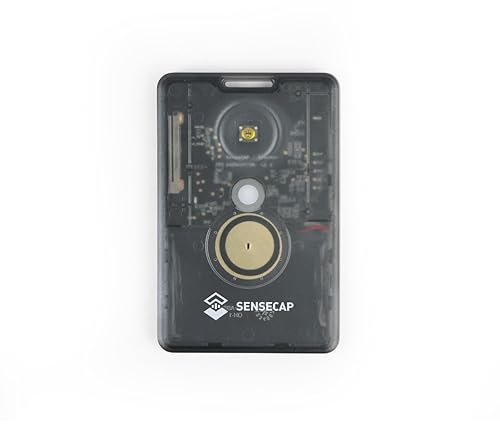
Sealed, pocket-size, built-in battery and GPS. Pairs with your phone and goes.
Setup
Minutes
Screen
None, use your phone
Price
~$50
Best for Hikers, families and anyone who wants it to just work
Tradeoff No antenna upgrades and a smaller battery
The easiest way into Meshtastic. It's the size of a credit card, has GPS and a built-in battery, and needs no soldering, flashing or 3D-printed case. Pair it with the app, pick your region, and you're on the mesh. About $51.
What we like
Works out of the box, no case or battery to add
GPS built in for sharing location
Card-size, clips to a pack or lanyard
What to know
No screen, so you need your phone to read messages
Two Heltec V3-style boards, each with a 1100 mAh battery, a protective case and a 915 MHz antenna, for about $64. It's the cheapest complete pair we'd buy, and the small OLED screen shows messages without your phone.
What we like
Two complete nodes, batteries and cases included
OLED screen shows messages without a phone
About $32 per node
What to know
ESP32 chip drains batteries faster than nRF52 radios
4.0-star average, some units arrive needing a reflash
A handheld with an e-ink screen, GPS and the low-power nRF52840 chip, so it runs for days on a charge and you can read messages in sunlight. About $63. The one to get once you know you're keeping at it.
A modular base board and the RAK4631 core, preflashed with Meshtastic, plus LoRa and Bluetooth antennas, for about $32. It's the low-power board people build fixed and solar nodes around. Battery and case are extra.
The stubby antenna that ships with most boards is the weakest part of the setup. A proper 915 MHz whip is the cheapest range upgrade there is. Match the connector, which is almost always SMA male for these boards, and match the band: 915 MHz in the US. Never power on a radio with no antenna attached, because it can damage the radio chip.
Best starter
muzi works
915 MHz Whip Antenna, 17 cm
$12.90 as of Nov 5, 2026
★★★★★Our rating· In Stock
A tuned whip antenna for about $13 that buyers measure at an SWR around 1.3, compared with roughly 3.5 for typical stock stubby antennas. That gap is real range. 4.6 stars from 400+ buyers.
A cheaper 17 cm whip for about $15 with 300+ reviews at 4.6 stars. The 10 dBi gain on the label is marketing, not physics, but it's a solid step up from a stubby.
What we like
Clear upgrade over the stock stubby
Soft whip bends without breaking
What to know
Ignore the 10 dBi claim, a whip this size can't do it
A node that lives on a roof, a fence post or a hilltop changes everything. Height is what gives Meshtastic its range, and a solar node can sit up there for months, relaying everyone's messages. You don't need one in week one. You'll want one the first time a message to a friend across town doesn't make it.
Best starter
Seeed Studio
SenseCAP Solar Node P1-Pro
$139.99 as of Nov 5, 2026
★★★★★Our rating· In Stock
A weatherproof, solar-powered Meshtastic node with a built-in battery and GPS, built around a low-power nRF52840. Mount it high, pair it once, and leave it. About $140.
What we like
Solar panel and battery built in, nothing to wire
Low-power chip keeps it running through cloudy days
A 5 W solar repeater in an IP67 case, built on RAK WisBlock modules, for about $109. A good value if you're comfortable checking settings in the app after it arrives.
Ready-made trackers have batteries built in, but dev boards and long weekends need backup power. A small 10,000 mAh power bank recharges a node many times over. One catch: some power banks shut off when a device draws very little, and a sleeping radio draws almost nothing. Test yours at home before you rely on it on a trip.
Best starter
Anker
Power Bank 10,000 mAh (PowerIQ, USB-C)
$20.89 as of Nov 5, 2026
★★★★★Our rating· In Stock
A pocketable 10,000 mAh bank for about $21 from the brand most people trust for this. Enough to recharge a tracker many times over a long weekend, and your phone too.
A slim 10,000 mAh bank with a detachable USB-C cable for about $22, with nearly 90,000 ratings. Charges phones fast, which matters when the phone is your Meshtastic screen.
Two radios, one app, and a walk around the block. Here's what the first two weeks of Meshtastic look like, from pairing to your first long-range message, and why the roof matters more than the radio.
Meshtastic has a quick start and a slow, satisfying middle. You’ll send your first message within ten minutes of opening the box. Then you’ll spend a couple of weeks learning what actually makes it reach: height, antennas and other people’s nodes.
Here’s the rough shape of the first two weeks.
Day 1: Pair, set the region, say hello
Install the Meshtastic app (iPhone or Android) and pair your first radio over Bluetooth. The app walks you through it.
Then do the one step everyone misses: set the region. In the US that’s US (915 MHz). Many radios ship with the region unset and won’t transmit at all until you choose one. If your two radios can’t see each other, this is almost always why.
Pair the second radio to a second phone, or to the same phone one at a time. Send a message. Watch it arrive. That’s the whole trick, and it still feels a little like magic the first time.
While you’re in the app, check the firmware version. If it’s old, update it with the web flasher in Chrome. It takes about five minutes.
Leave one radio at home on a windowsill and walk away with the other. Send a message every few blocks. At some point they’ll stop arriving. That’s your real ground-level range, and in a town it’s often one to two miles, sometimes less.
Things you’ll notice:
Windows help, walls hurt. A radio on an upstairs windowsill reaches much farther than one in a basement.
Hills block everything. LoRa needs something close to line of sight.
The antenna matters. If your board came with a stubby antenna, swap it for a proper 915 MHz whip and repeat the walk. The difference is easy to see.
Days 6 to 10: Channels and the people near you
By default you’re on a shared public channel, and anyone nearby on the same settings can read it. Set up a private channel for your own group. The app generates a key you share by QR code. Messages on that channel are encrypted.
Then look at the node list. If other people’s radios show up, you’re on a local mesh, and your messages can hop through their nodes to reach much farther. Say hello on the public channel. Local mesh groups are usually friendly and keen to help newcomers.
This is the step that turns Meshtastic from a novelty into something useful. A node on a roof, a tall fence post or a hilltop can reach ten miles or more, and it relays for everyone.
You don’t need a solar node to try this. Tape a radio and a power bank in a zip bag to the highest window or balcony you have, leave its role on Client (the docs reserve Router for well-placed permanent nodes), and repeat your range walk. Most people are surprised by how much farther it reaches.
If that convinces you, a weatherproof solar node is the next purchase.
What not to worry about yet
Don’t chase the longest-range record you’ve seen online; those links use mountains and big antennas. Don’t buy ten nodes. Don’t fiddle with advanced radio settings like spreading factor until you understand why the defaults are the defaults. Two radios, one high node, and a group of friends on a private channel is the hobby, and it’s a good one.
Save your money
What you don't need yet
Beginners get pressured to buy a lot of stuff that doesn't help them play
better. Here's what we'd skip on day one.
A ham radio license — Meshtastic runs on license-free LoRa bands. You only need a license for ham-mode features you won't use as a beginner.
A big fiberglass base antenna — Worth it for a permanent rooftop node later. For handhelds, a $13 whip is the right upgrade.
A 3D printer for cases — Buy a bundle with cases or a ready-made tracker. Printing cases is a fun rabbit hole for later.
A dozen nodes — Two radios tell you if you like it. Add more once you know where a fixed node would help.
Satellite messengers — Different tool for real emergencies. Meshtastic is for texting your own group, not calling for rescue.
First week
Your first seven days
A short, real plan to get from gear-on-doorstep to actually playing.
Check whether there's already a mesh near you before you buy. · Learn
No. In the US, Meshtastic uses the license-free 915 MHz ISM band. Licensed ham operators can enable extra modes, but beginners don't need to.
How far can Meshtastic reach?
At ground level in a town, expect about one to two miles between handhelds. With one node on a roof or hill, ten miles or more is common, and record links are far longer. Height matters far more than the radio you buy.
Does Meshtastic work without cell service?
Yes, that's the point. Radios talk to each other directly and relay messages. Your phone only connects to your own radio over Bluetooth, so it works in airplane mode.
What frequency should I buy in the US?
915 MHz. Radios sold for 868 MHz are for Europe and 433 MHz is for other regions. Check the listing carefully, then set the region to US in the app.
Can I send voice or photos?
No. Meshtastic sends short text messages and location. LoRa is slow by design, which is why it reaches so far on so little power.
Is Meshtastic private?
The default channel is shared with everyone on your mesh. Create a private channel with its own key for your group, and messages on it are encrypted.
Meshtastic documentation — The official getting-started guide. Covers every supported device, the phone apps and region settings. Read this before you flash anything.
Meshtastic web flasher — Flash or update firmware from a Chrome browser over USB. No software to install.
r/meshtastic — Active community for hardware advice, antenna tests and finding a local mesh near you.
Meshtastic GitHub — Firmware and app source, plus release notes when a new version changes how settings work.
JustBeginning earns commission from affiliate programs. As an Amazon
Associate, we earn from qualifying purchases. This costs you nothing
extra and doesn't change our recommendations.
Prices and availability are accurate as of the date and time
shown and can change; the price on Amazon when you buy is what
applies.
How this works.

 Best starter


